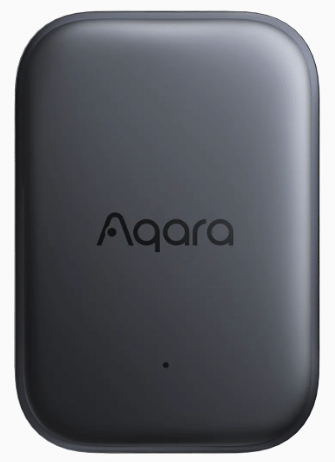
After a less than exciting start in which I took the new P100 out of the box and remove the protective strip that saved the battery during shipping, I started looking at the instructions for this new device, which mentions “Aqara hub required” or “built on Thread requires a router.” At this point, I began to think, “No, I will just give this one a miss.” Anyway, I persevered and read through a huge sheet of Bluetooth instructions in various languages which seemed to have nothing to do with anything, and there was a very small sheet giving me a choice of “matter” or “magic pair.” I decided to hook the device into the Aqara app with the magic pair code, at which point I was given a choice of Thread or Zigbee.That’s better, I thought – the device went off to the web to get some new firmware and, moments later, was updated and running on Zigbee, at which point I could put the Aqara app away and pair it with my local Zigbee2MQTT.I run Home Assistant with Zigbee2MQTT added in, and before that, I used to run Node-Red for Zigbee2MQTT.
I really have little patience for proprietary apps and don’t know an awful lot about Thread.Anyway, I pressed the JOIN button on Zigbee2MQTT, and after a few moments, the device was added to Zigbee2MQTT.I did the usual rename and tick to add the new name to Home Assistant, and I was up and running in Zigbee2MQTT with what I named the Aqara-P100.
Below is the entire content of the EXPOSES tab in Zigbee2MQTT… for the sake of it I enabled everything.I then dropped the unit a few inches onto my desk and in ACTION I saw MOVEMENT.I then tapped the unit once and saw VIBRATION.
I then tapped it 3 times in quick succession and saw TRIPLE_TAP.I then tipped the device up 90 degrees and saw MOVEMENT.That’s not very obvious to me.
I turned the unit carefully back to it’s original position and saw TRIPLE_TAP – I don’t follow that one at all! In OBJECT mode, re-orienting the unit resulted in MOVEMENT..Ah, and ORIENTATION responded with FACE_UP, FACE_DOWN and VERTICAL accordingly.
Read More